
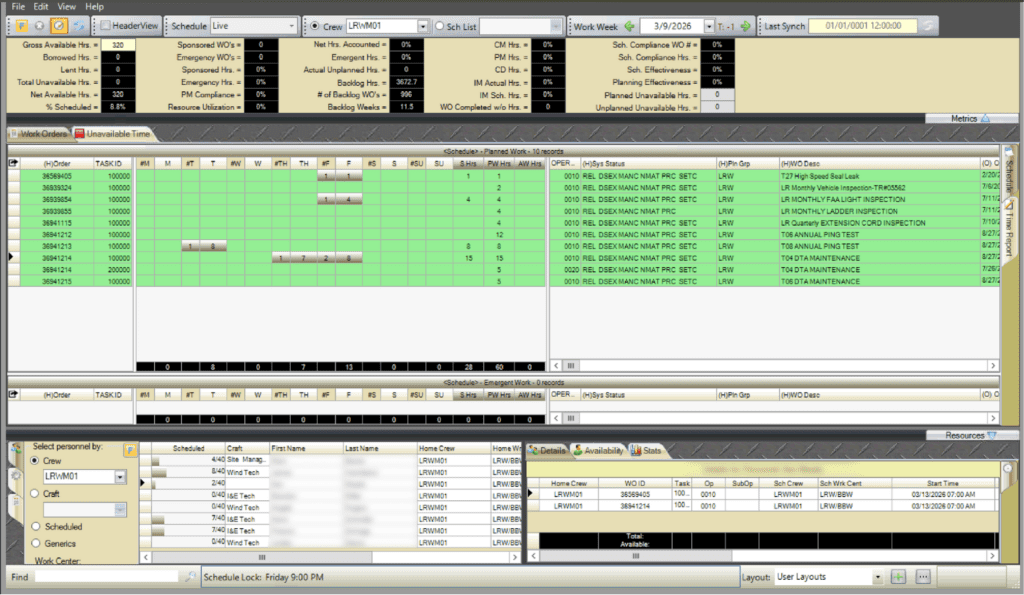
The WWS is where the planned work from the WWA is turned into an executable schedule. From this screen, users assign personnel and equipment to the work orders. They account for unavailable hours, balance workloads against capacity, and track scheduled versus actual hours.
Assign Resources to Work Orders
In the WWS, personnel and equipment are assigned directly to work orders by day within the selected T-week. Resources are selected from the lower-left panel and dragged onto the appropriate day of the work order, where hours are entered.
Balance Workload and Capacity
As resources are assigned, the WWS provides tools to compare workload against available capacity. Schedulers can review craft distribution, identify over or under allocation, and make adjustments to ensure work is scheduled realistically for the week.
Plan Unavailable hours
The Unavailable Time tab is used to record planned and unplanned time when personnel cannot perform scheduled work. Hours are entered by selecting personnel and dragging them into the appropriate Unavailable Time grid, then entering the number of unavailable hours by day.
Planned Unavailable Time in a T- (T minus) week is used for known absences such as vacation, training, or scheduled leave. Unplanned Unavailable Time is used during the current work week (T-0) for unexpected absences.