
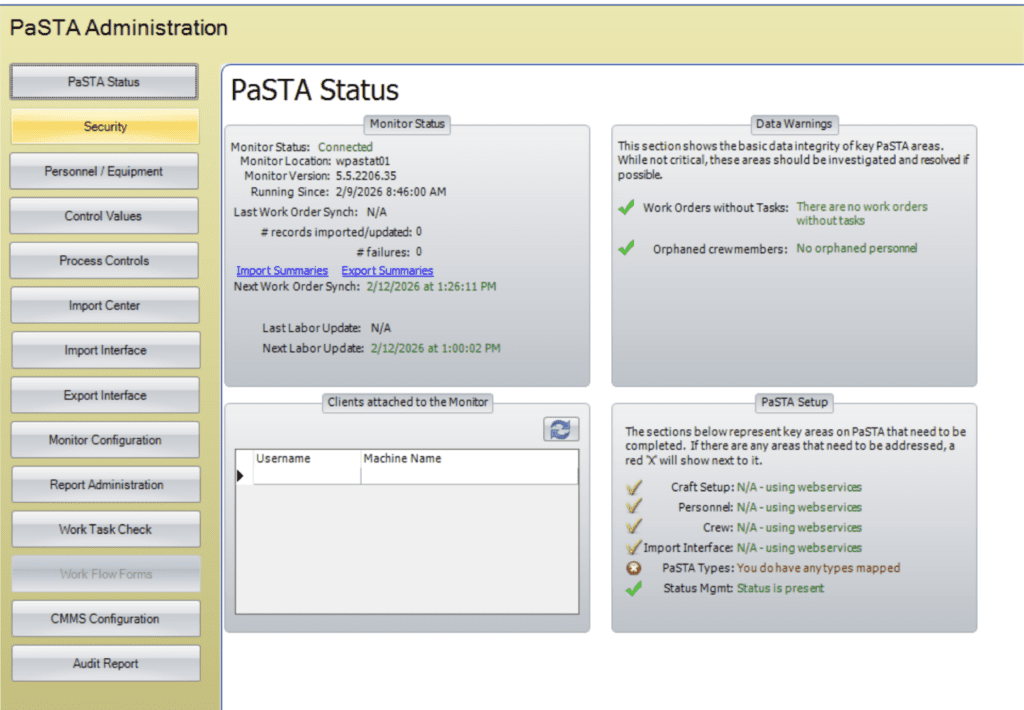
- PaSTA Status: Displays basic system information, including software version, last import time, and currently active users.
- For organizations using the Web Utility Interface, detailed system health and sync diagnostics are reviewed within the platform.
- Security: Manage user accounts, security roles, and login privileges.
- Personnel / Equipment: Define and maintain crews, personnel, crafts, shift patterns, and equipment.
- Control Values: Configure system values like work order types, status roles, rollover/emergent codes, email, and scheduling defaults.
- Process Controls: Define rules for work weeks, work orders, tasks, and overall PaSTA operations.
- Import Center: Import monitoring, filtering, error resolution, and reprocessing.
- For organizations using the Web Utility Interface, this is handled in Web Utility’s Importer Interface.
- Import Interface: Manage imported data display settings such as column header captions, editable/hidden fields, and other layout configurations.
- Note: These display settings (as well as color rules) can also be managed by right-clicking on the header in the WWA or WWS and selecting Properties.
- If your organization is not using the Web Utility Interface, SQL statements and other import features are configured here.
- Export Interface: Manage outgoing messages, such as work order updates or task changes.
- Organizations not using the Web Utility Interface can manage database connections and SQL statements here.
- Monitor Configuration: Configure the monitor address and port settings. When the client is connected to the monitor, this area displays users who are currently logged in to PaSTA.
- If your organization is not using the web utility interface, Monitor synchronization settings are managed here.
- Report administration: Manage report setup, sharing, auto-generation, and email distribution.
- Work Task Check: Data verification between Maximo and PaSTA is now viewed in the Web Utility’s validation panels.
- Organizations not using the Web Utility Interface with web services can enter connection information here to view imported work orders.
- Work Flow Forms: Manage workflow forms used within PaSTA (if enabled).
- CMMS Configuration: Configure CMMS settings here, including the ability to enable or disable the creation of work orders, notifications/work requests, and the ability to add new long text entries.
- Audit Report: System audit logs and activity tracking.